PDF Analyzer
Analyze a specified PDF file and extract text information. Note that the specified PDF file should conform to the PDF/A standard.
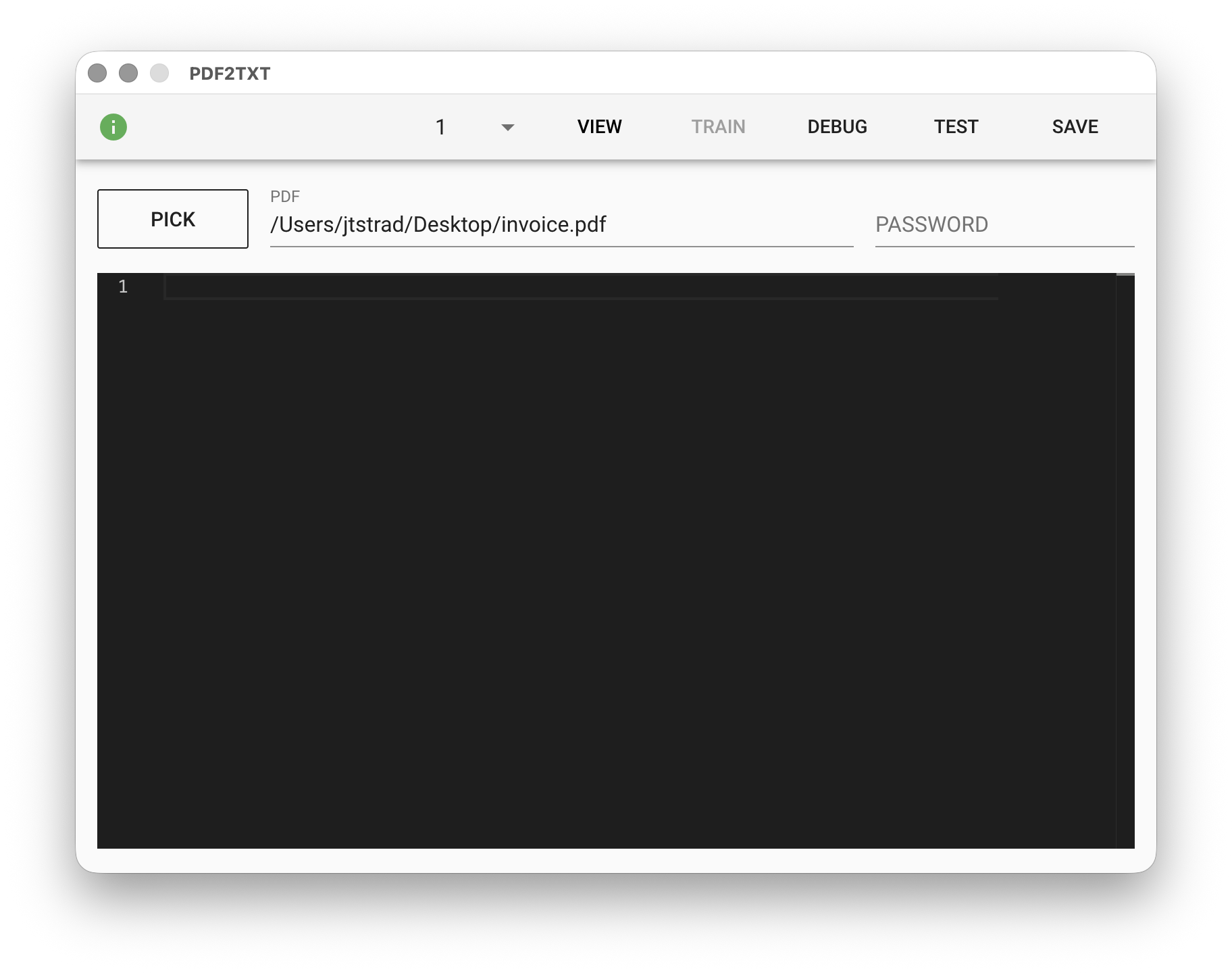
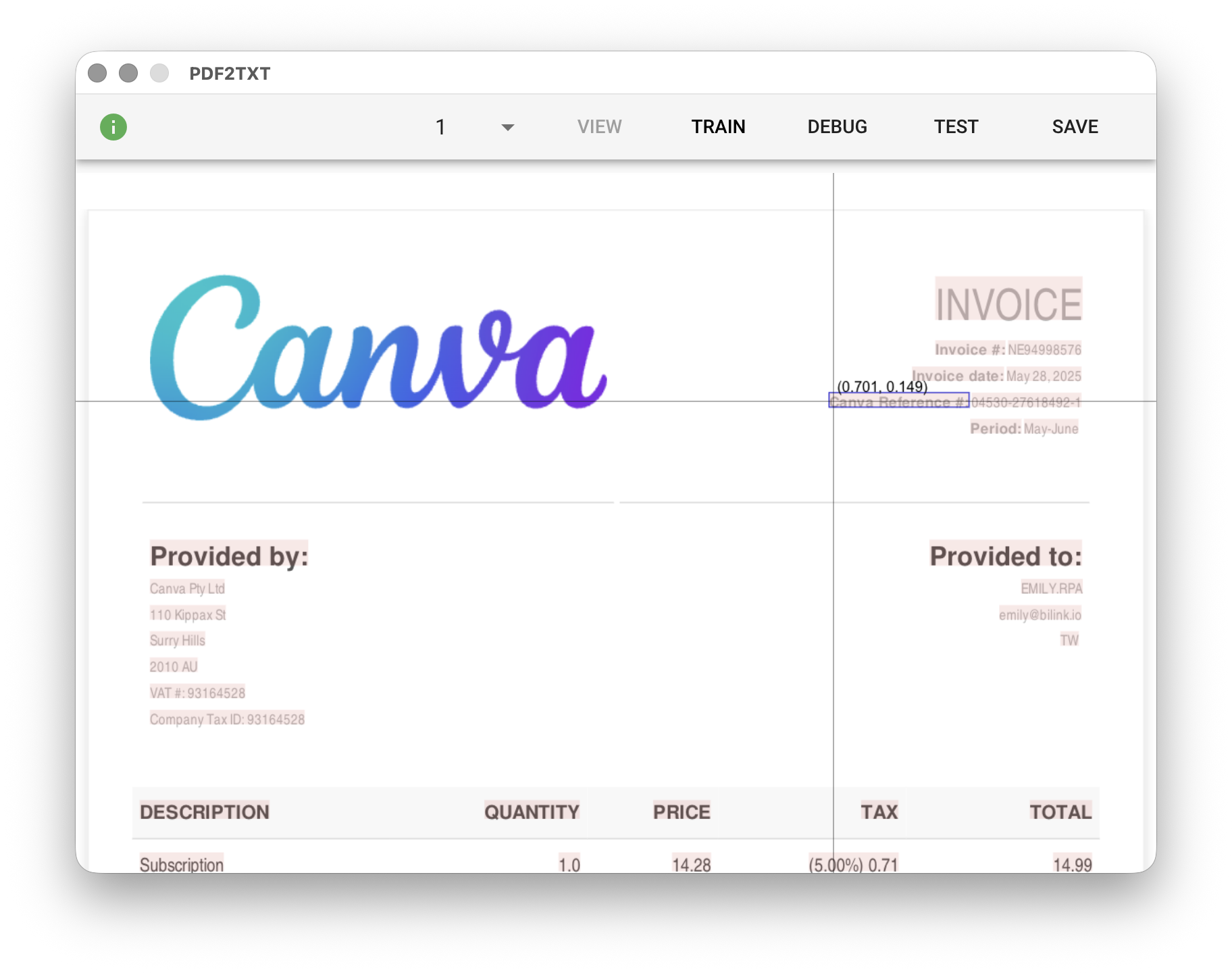
You can select two modes at the top of the module: "VIEW" and "TRAIN". In "TRAIN" mode, you can write code. In "VIEW" mode, you can preview the document. Page navigation can be done through the page number dropdown menu on the left.
Parameters
PDF - The PDF format input file. Supports ISO-standard PDF/A format. Click "PICK" to select a file, type a PDF filename from the working folder, or use the %FILENAME% variable.
PASSWORD - The password for the PDF input file. Supports the %FILENAME% variable.
Coordinate System
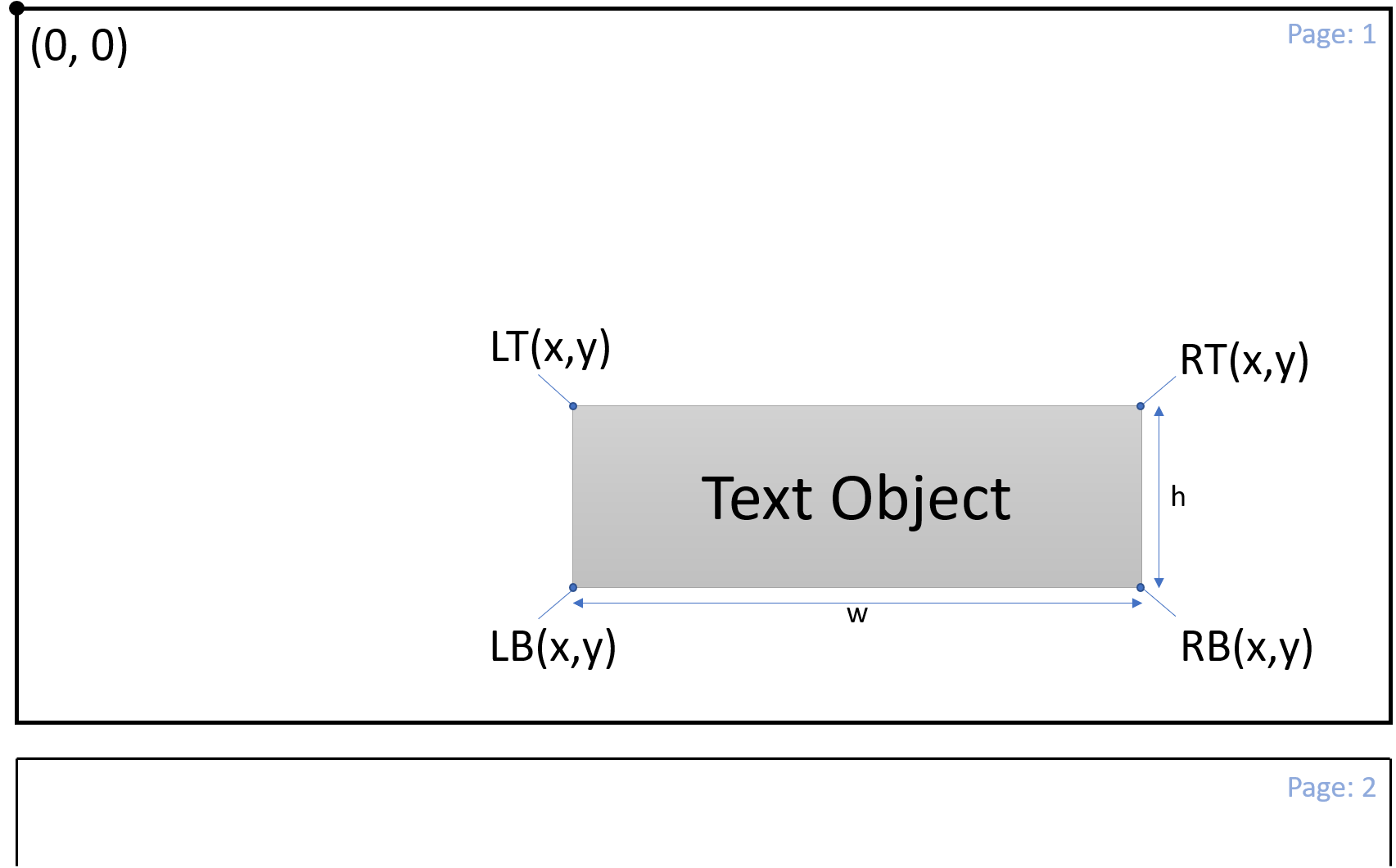
The module uses the Page Normalized Coordinate (PNC) coordinate system. The origin is at the top-left corner (0,0) of the first page of the document, and the coordinate range of each page is normalized to adjacent integers. Coordinates are expressed as (x,y), where both x and y can have decimals. The coordinate range of the first page is (0,0) to (1,1), the second page is (0,1) to (1,2), and so on. For example, (0.5,1.5) represents the center of the second page.
Text Object
After parsing the specified file, the module produces all text objects in the document. In addition to the text content, each text object also contains the coordinates of the text.
No-Code Visual Editor (VIEW)
The "VIEW" visual editor allows you to generate Low-Code code through mouse and keyboard combinations on the document preview. In the visual editor, hovering the mouse over page text highlights text objects and coordinates. You can also automatically generate code through mouse and keyboard combinations. After completing the operation, the generated code is stored in the clipboard, which you can paste directly into the Low-Code editor or modify further.
Capture Text Object
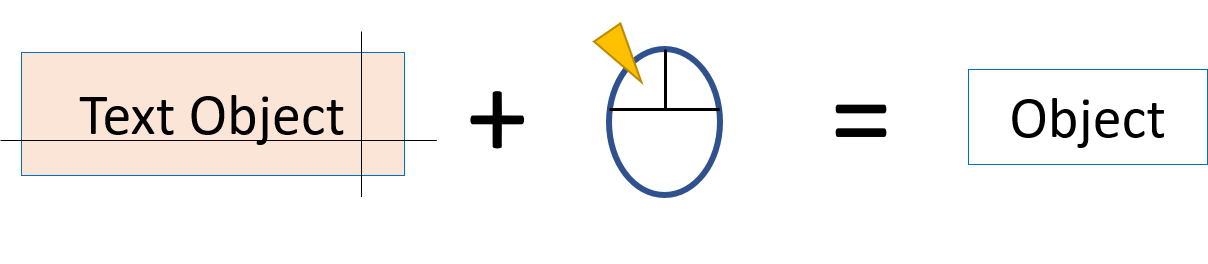
Click on text object with mouse
Generate Bounds
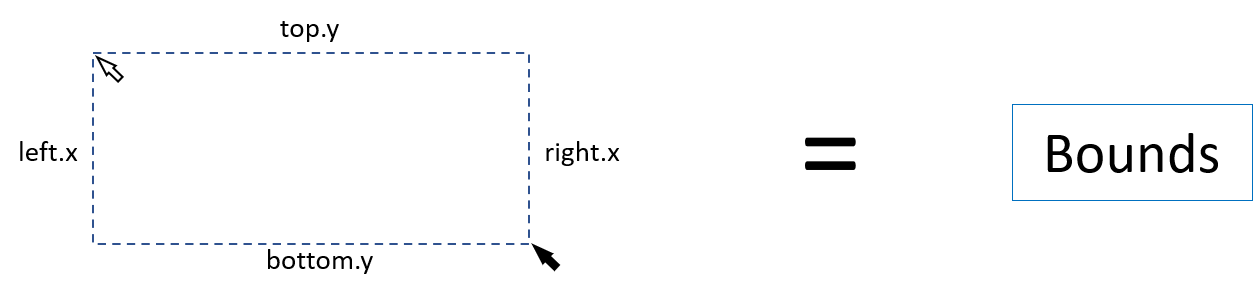
Drag the mouse to draw a selection box over the desired area
Directional Resolution

Place the cursor on a key object and press Shift + arrow key to resolve the first object encountered in that direction
Range Resolution

Place the cursor on the starting key object and press Shift, then move the cursor to the ending key object and click to select objects between them
Relative Area Resolution
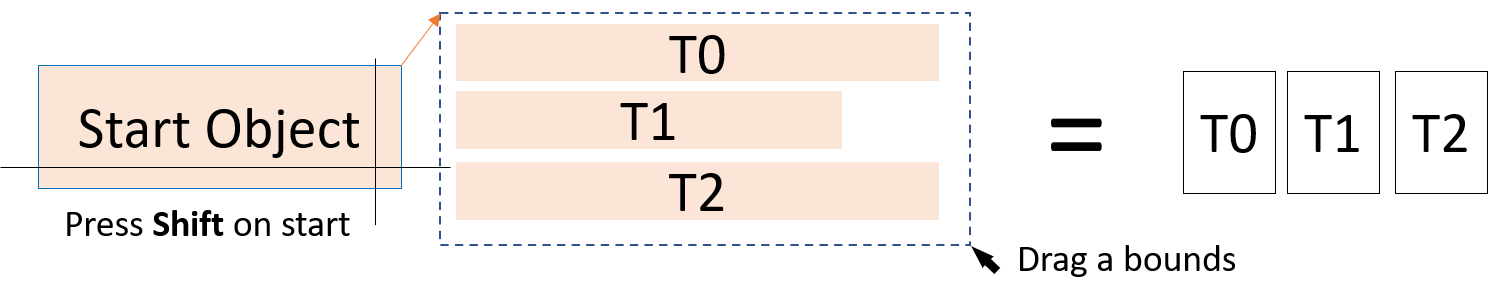
Place the cursor on the starting object and press Shift, then move the cursor to the desired area and drag to draw a selection box
Low-Code Editor (TRAIN)
input Object
The input object is the data object converted from the PDF file. It contains all text objects, line objects, etc. after coordinate normalization, as well as functions needed for parsing.
Doc{
    totalPages,    // Total number of pages in the document
    pageInfo[],    // Page information, such as pixel width/height of each page
    textData[],    // Text object array
    hLines[],      // Horizontal line array
    vLines[],      // Vertical line array
    blocks[],      // Block (composed of horizontal and vertical lines) array
    tables[],      // Table (composed of blocks) array
}
A text object is the smallest unit used for document parsing. Each text object has the following properties:
textObject{
    text,            // Text content of the text object
    LT{},            // Top-left corner coordinates of the text object
    LB{},            // Bottom-left corner coordinates of the text object
    RT{},            // Top-right corner coordinates of the text object
    RB{},            // Bottom-right corner coordinates of the text object
    C{},             // Center point coordinates of the text object
    w,               // Width of the text object
    h,               // Height of the text object
    block{},         // Records the relationship between this text object and document tables
    isDeleted(),     // Check if the text object is crossed out by a horizontal line
    detectLine(dir), // Detect and return the nearest line, dir can be "up", "down", "left", "right"
    detectGroup(),   // Detect and return all text objects with the same neighboring lines, useful for detecting all text objects within the same cell.
}
Resolution Functions
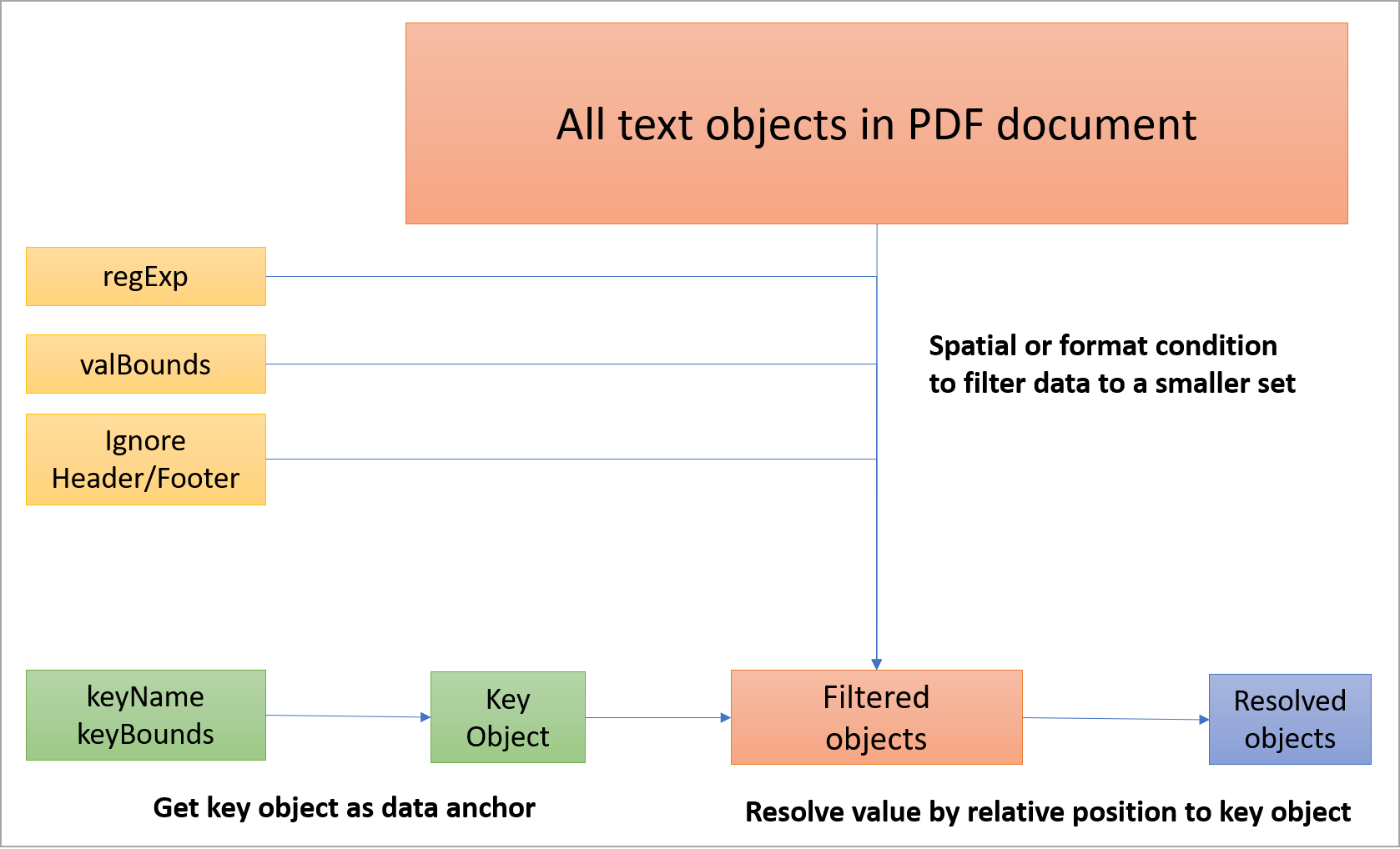
PDF document parsing logic
The input object provides several resolution functions and utility functions to help users find target objects in space. The overall parsing logic involves narrowing down the set of text objects using spatial or textual conditions, then finding the target object through relative relationships.
textObj = input.getKeyObj( keyName, keyBounds, options )

// keyName: The text string of the text object
// keyBounds: The search range object, format: {"top":num,"bottom":num,"left":num,"right":num,"page":num}
// options: Options object, supports the following options
// "regExp": Use regular expression to filter the search range
// "ignoreHeader": Ignore data in the upper area of each page, range defined by a decimal (percentage of page height)
// "ignoreFooter": Ignore data in the lower area of each page, range defined by a decimal (percentage of page height)
// "all": Boolean, if enabled the function returns all found text objects (in array form)
textObj = input.resolve( target, options )

// target: Target object, includes key object (keyObj) or (keyName/keyBounds) combination, resolution direction (valPos), resolution range (valBounds) or relative resolution range (relValBounds)
// options: Options object, supports the following options
// "regExp": Use regular expression to filter the search range
// "ignoreHeader": Ignore data in the upper area of each page, range defined by a decimal (percentage of page height)
// "ignoreFooter": Ignore data in the lower area of each page, range defined by a decimal (percentage of page height)
textObjs[] = input.resolveRange( target, options )

// target: Target object, includes start key object (startKeyObj) or (startKeyName/startKeyBounds) combination, end key object (endKeyObj) or (endKeyName/endKeyBounds) combination, resolution direction (valPos), resolution range (valBounds) or relative resolution range (relValBounds)\
// options: Options object, supports the following options
// "regExp": Use regular expression to filter the search range
// "ignoreHeader": Ignore data in the upper area of each page, range defined by a decimal (percentage of page height)
// "ignoreFooter": Ignore data in the lower area of each page, range defined by a decimal (percentage of page height)
[Experimental] textObjs[] = input.resolveTable( target, options )

// target: Target object, includes key object (keyObj) or (keyName/keyBounds) combination, resolution direction (valPos), resolution range (valBounds) or relative resolution range (relValBounds)
// valType: Resolution mode, can be ROW, ROW(Num), COL, COL(Num), REPEAT.
// ROW/COL mode resolves the entire row/column of data
// ROW(Num)/COL(Num) mode resolves Num values to the right/below of the key
// REPEAT mode resolves data at the key position in all similar tables
// options: Options object, supports the following options
// "regExp": Use regular expression to filter the search range
// "includeKey": Boolean, if true, the return value of row/column resolution will include the key from the target.
// "tableRefs": An object array with the format {"refText":string, "R":num, "C":num}. This object array defines what identical content "similar tables" must have.
Utility Functions
strings[] = input.textGrouping( textObjs , option)

// textObjs: Array of text objects to be reorganized
// Option: Arrangement option, can be LINES, TDLR, LRTD (default)
// Note: The sorting logic groups text objects with line height less than 1.5x / spacing less than 2 character widths. Then sorts each group in TDLR or LRTD order and outputs each group's string sequentially.
// Note2: LINES mode groups by height on the same line and returns strings line by line.
textObjs[] = input.textSort( textObjs, mode = 0)

// textObjs: Array of text objects to be reorganized
// Mode: Sort mode, currently only left-to-right, top-to-bottom object sorting.
// Note: Returns a new sorted array.
num = input.checkBounds( keyBounds, textObj )
// (0 = no overlap, 1 = partial overlap, 2 = object contained within the range)

// keyBounds: The range to test. Format: {top:num, bottom:num, left:num, right:num}
// textObj: The text object to test
output Object
Each key added to the output object will be exported as a TXT file in the working folder, where the filename is the key and the text content is the corresponding value.
Examples
// 1.Resolve single value by Name:
let target = {keyName:"PRODUCTION ORDER", keyBounds = "page":1, valPos:"RIGHT" }
let productOrderNum = input.resolve( target );
// result: productOrderNum.text = "423022"


// 2.Resolve single value by object:
let orderObj = getKeyObj("PRODUCTION ORDER", {page:1})
let target = {keyObj: orderObj, valPos:"RIGHT"}
let productOrderNum = input.resolve( target );
// result: productOrderNum.text = "423022"


// 3.Resolve single value with regExp Filter:
let target = { keyName:"Coord #", keyBounds = {page:1, valPos:"RIGHT"}
let options = {"regExp":/\d{2}\/\d{2}\/\d{2}/ }
let issueDate = input.resolve( target, options );
// result: issueDate .text = "06/24/20"


// 4.Resolve multiples values by start/endKeyObjects:
let startObj = input.getKeyObj( "Ship Type", {page:1} )
let endObj = input.getKeyObj( "Ship Terms", {page:1} )
let target = {startKeyObj:startObj, endKeyObj:endObj, valPos:"RIGHT"}
let interData = input.resolveRange(target)
//Result:  interData[0].text = "AW"
//Result:  interData[1].text = "Ship Via"
//Result:  interData[2].text = "SEA"


// 5.Resolve multiples values by valBounds:
let sellerObj = getKeyObj("To (Seller):", {page:1})
let codeObj = getKeyObj({"Code:", {page:1})
let accObj = getKeyObj("Acc Sup:", {page:1})
let target = {valBounds:{top:sellerObj.LB.y, right:accObj.LB.x, bottom:codeObj.LT.y, page:1 } }
let address = input.resolveRange(target)
//Result:  address[0].text = "TAIEASY INTERNATIONAL. CO., LTD"
//Result:  address[1].text = "11F., NO. 1, JIHU RD., NEIHU DIST.,"
//Result:  address[2].text = "TAIPEI CITY 114,"
//Result:  address[3].text = "TAIWAN (R.O.C.)"
//Result:  address[4].text = "TAIPEI CITY, TAIWAN"


// 6.Resolve multiples values by relValBounds
let facObj = getKeyObj("Mfrag Fac:", {page:1})
let target = {relValBounds:{top: -0.01, right:0.25, bottom:0.09, left:0.0} }
let location= input.resolveRange(target)
//Result:  location[0].text = "FORMOSA VIET NAM TEXTILE INDUSTRY"
//Result:  location[1].text = "CO.,LTD"
//Result:  location[2].text = "MY XUAN A2 INDUSTRIAL ZONE, MY XUAN"
//Result:  location[3].text = "WARD,"
//Result:  location[4].text = "PHU MY TOWN, BA RIA - VUNG YAU"


// 7.Resolve value with ignore options
let buyerObj = input.getKeyObj("By Buyer",{page:1})
let target = {keyObj:buyerObj, valPos:"DOWN"}
let options = {ignoreHeader:0.22, ignoreFooter:0.85}
let downVal= input.resolveRange(target, options)
// downVal.text = "To (Seller)"


// 8.Resolve block values in Table.
let target = {keyName:"DESC", keyBounds:{page:1}, valPos:"DOWN"}
let blockVal= input.resolve(target)
// blockVal.text = "TRAINER PANT"
let allBlockVal = input.resolveTable({keyObj:blockVal})
// allBlockVal.text = "TRAINER PANT
//                               YOUTH"


// 9.Resolve row blocks values in Table.
let target = {keyName:"Ship Via", keyBounds:{page:1}, valType:"ROW"}
let blockVals = input.resolveTable(target)
// blockVals[0].text = "Ship Type"
// blockVals[1].text = "AW"
// blockVals[2].text = "Ship Via"
// blockVals[3].text = "SEA"
// blockVals[4].text = "Ship Terms"
// blockVals[5].text = "FOB"
target.valType = "ROW"
blockVals = input.resolveTable(target);
// blockVals[0].text = "SEA"
// blockVals[1].text = "Ship Terms"
// blockVals[2].text = "FOB"
target.valType = "ROW2"
blockVals = input.resolveTable(target);
// blockVals[0].text = "SEA"
// blockVals[1].text = "Ship Terms"


// 10.Resolve Column/Row blocks values in Table.
let target = {keyName:"Coord #", keyBounds:{page:1}, valType:"COL5"}
let options = {includeKey:true}
// get 6 headers in first column
let colVals = input.resolveTable(target, options)
// get row values for each header
colVals.forEach( head => {
	let rowVals = input.resolveTable({keyObj:head, valType:"ROW0"})
})
// for "Coord #" row
// 	rowVals[0].text = "TRAINING"
// 	rowVals[1].text = "PO Issue Date"
// 	rowVals[2].text = "06/24/20"
// for "Season" row
// 	rowVals[0].text = "204HO"
// 	rowVals[1].text = "Last Revised Date"
// 	rowVals[2].text = "06/24/20"
// for "Payment Terms" row
// 	rowVals[0].text = "75 DAY TERMS THROUGH GT NEXUS"
// for "Ship Type" row
// 	rowVals[0].text = "AW"
// 	rowVals[1].text = "Ship Via"
// 	rowVals[2].text = "SEA"
// 	rowVals[3].text = "Ship Terms"
// 	rowVals[4].text = "FOB"
// for "Ref#" row
// 	rowVals[0].text = "204HO NTM056 YRR PNP A"
// for "Bene" rows
// 	rowVals[0].text = "NTM064 TAIEASY INTERNATIONAL CO.,LTD"


// 11.Resolve repeat blocks values in Table.
// find first origin
let target = {keyName:"Country of Origin", keyBounds:{"page":1}, "valPos":"RIGHT"}
let originVal = input.resolve(target)
//  originVal.text = "Vietnam"
// Resolve origins in other tables
let options = { tableRefs: [
                {refText:"Item:", R:0, C:0},
                {refText:"Country of Origin", R:1, C:0}
                ]}
let blockVals = this.resolveTable({keyObj:originVal, valType:"RIGHT"})
// blockVals[0].text = "VietNam"
// blockVals[1].text = "Taiwan"
// blockVals[2].text = "China"